
autorip Service
autorip is a rip service: insert a disc, and it rips automatically to MKV. A browser-based UI shows live progress, settings, and history, with nothing to type. This page covers deploying autorip and tuning it; for the manual command-line workflow, see the CLI reference.
On disc insert, autorip runs the full pipeline automatically: a tolerant sweep, targeted patch retries on bad ranges, decrypt, and mux to MKV. Multiple drives rip in parallel, each with independent state.
autorip runs on Linux, macOS, or Windows, on a host with an optical drive (a home server or NAS works well). Run it as a single binary, or (on Linux) via Docker. Linux is the most-tested target; the configuration and API reference below apply to every platform. The container and udev rip-on-insert trigger are Linux-only; on macOS and Windows the daemon polls for inserted discs.
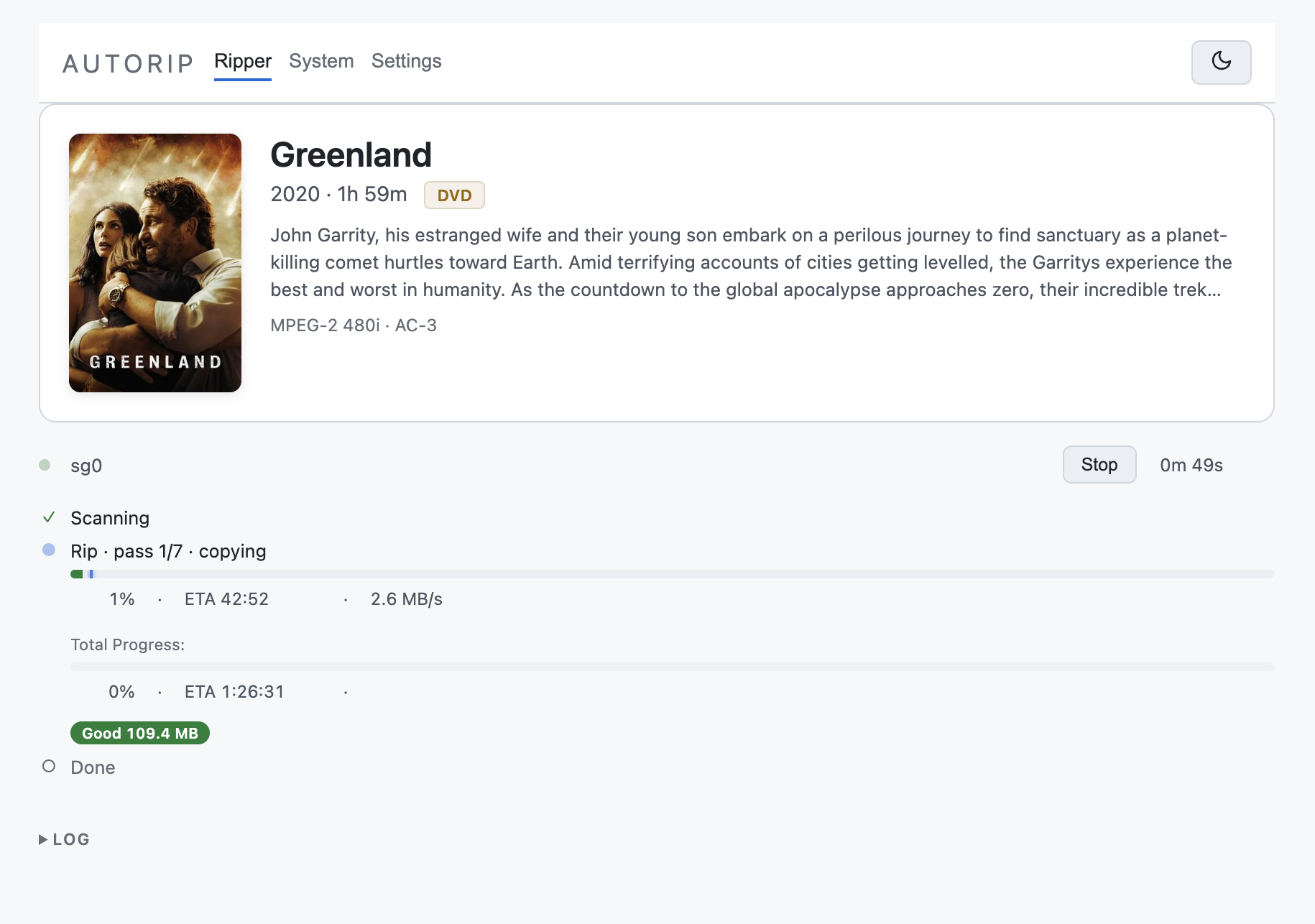
The autorip dashboard during an active rip: matched title and metadata up top, with live per-pass progress, ETA, and throughput below.
Deploy
Section titled “Deploy”Binary
Section titled “Binary”Get the autorip binary from the Download page, then run the service:
# rename to `autorip`, make it executable, and start the servicemv autorip-* autorip && chmod +x autorip./autorip serve # then open http://localhost:8080One static binary, no container, no runtime. Drive access uses the cdrom group or a udev rule (no --privileged); point AUTORIP_DIR, OUTPUT_DIR, and STAGING_DIR at local paths.
Docker
Section titled “Docker”Published to GHCR as ghcr.io/freemkv/autorip (:latest and :vX.Y.Z). Drop this compose file on a host with an optical drive and bring it up:
services: autorip: image: ghcr.io/freemkv/autorip:latest container_name: autorip restart: unless-stopped privileged: true # REQUIRED for optical SCSI drive access environment: - AUTORIP_DIR=/config # where settings.json + logs live - PORT=8080 # web bind port (set at start, not at runtime) - AUTORIP_LOG_LEVEL=autorip=info,libfreemkv=warn # tracing filter volumes: - /dev:/dev # live host /dev (handles USB re-enumeration) - ./config:/config # settings.json + logs - /mnt/media:/output # final MKV / M2TS destination - /tmp/autorip:/staging # intermediate ISO + mapfile - /sys:/sys:ro # read-only sysfs ports: - 8080:8080 healthcheck: test: ["CMD", "curl", "--fail", "--silent", "--max-time", "4", "http://127.0.0.1:8080/api/state"] interval: 30s timeout: 5s start_period: 20s retries: 3docker compose up -dThen open http://<host>:8080.
Mount reference
Section titled “Mount reference”| Mount | Purpose |
|---|---|
/dev:/dev | Live host device tree; lets autorip enumerate optical drives and survive USB re-enumeration. |
/config | Persistent home for settings.json, per-device logs, and (by default) the keys directory. |
/output | Where finished MKV/M2TS files land. |
/staging | Intermediate ISO + mapfile during a multipass rip. |
/sys:ro | Read-only sysfs. |
Decryption keys
Section titled “Decryption keys”DVDs need none; Blu-ray and 4K UHD need keys. See Decryption Keys for the options (a local file or an online service). autorip’s key settings live in Configuration → Keys below.
For Docker, bind-mount a host directory to /root/.config/freemkv so keys persist across restarts:
volumes: - ./config/keys:/root/.config/freemkvBootstrap environment variables
Section titled “Bootstrap environment variables”These are read at container start and cannot be changed at runtime:
| Variable | Default | Meaning |
|---|---|---|
PORT | 8080 | Web UI / API bind port. |
AUTORIP_DIR | /config | Where settings.json and logs are stored. |
AUTORIP_LOG_LEVEL | autorip=info,libfreemkv=warn | tracing filter for log verbosity. |
RIP_USER | autorip | Unix user the container creates and runs the daemon as. |
NFS_HOST | (unset) | If set with the two below, autorip mounts an NFS share inside the container at startup. |
NFS_EXPORT | (unset) | Export path on the NFS server (e.g. /mnt/pool/media). |
NFS_MOUNTPOINT | (unset) | Where to mount the share inside the container; point output_dir here. |
NFS_OPTS | (sensible default) | Optional override for NFS mount options. |
Everything else is configured through the web UI and persisted to settings.json. The NFS mount is best-effort: if the server is unreachable the container still starts and logs the failure.
Configuration reference
Section titled “Configuration reference”All settings are editable in the Settings page of the web UI and stored in settings.json under AUTORIP_DIR.
Paths and library
Section titled “Paths and library”| Setting | Default | Meaning |
|---|---|---|
staging_dir | /staging | Where intermediate ISO + mapfile live during a rip. |
output_dir | /output | Final MKV / M2TS destination. |
movie_dir | (empty) | Optional subdirectory under output for movies. |
tv_dir | (empty) | Optional subdirectory under output for TV. |
output_format | mkv | Output container: mkv, m2ts, or iso. |
network_target | (empty) | Network output target host:port (for streaming output). |
keep_iso | false | Keep the intermediate ISO in the library after muxing. |
Disc handling
Section titled “Disc handling”| Setting | Default | Meaning |
|---|---|---|
on_insert | scan | What to do on disc insert: nothing, scan, or rip. |
auto_eject | true | Eject the disc automatically after a rip completes. |
main_feature | true | Rip only the longest (main feature) title. |
min_length_secs | 600 | Ignore titles shorter than this many seconds. |
Recovery tuning
Section titled “Recovery tuning”| Setting | Default | Meaning |
|---|---|---|
max_retries | 1 | 0 = single-pass (no retries); 1-10 = multipass with that many patch passes. |
on_read_error | stop | On a read error during the sweep: stop or skip (skip-ahead). |
abort_on_lost_secs | 0 | Tolerated main-movie loss in seconds after retries; 0 = require a perfect rip. |
capture_without_keys | false | Capture to ISO even when AACS keys are missing, deferring the mux. |
max_rip_duration_secs | 28800 (8 h) | Hard ceiling on total rip time across all passes. |
min_pass_budget_secs | 5400 (90 m) | Minimum wall-clock budget allotted to each pass. |
transport_recovery_delay_secs | 5 | Delay after a USB transport re-enumeration before retrying the drive. |
decrypt_threads | 0 | Decryption worker threads; 0 = auto-detect CPU cores. |
| Setting | Default | Meaning |
|---|---|---|
key_source | local | local (use a local key database) or online (use a key service). |
keydb_path | (unset) | Explicit path to a local key database file. |
keydb_url | (empty) | URL to download a key database from (used by the update action and daily refresh). |
keyserver_url | (empty) | Base URL of an external key service (when key_source = online). |
keyserver_secret | (empty) | Optional bearer token for the key service. |
Metadata and notifications
Section titled “Metadata and notifications”| Setting | Default | Meaning |
|---|---|---|
tmdb_api_key | (empty) | TMDB API key for title lookup / matching. |
webhook_urls | (empty) | URLs that receive a JSON POST on rip / move events. |
log_retention_days | 30 | How long to keep per-device .log files. |
Recovery
Section titled “Recovery”autorip wraps the same recovery engine as the freemkv CLI; see How recovery works for the full sweep-and-patch model. The max_retries setting selects between two modes.
Pass modes
Section titled “Pass modes”- Single-pass (
max_retries = 0) streams the disc directly to the output container. No intermediate ISO, no retries. Fastest path; appropriate for healthy discs. - Multipass (
max_retries ≥ 1) runs the full recovery pipeline:- Sweep reads the whole disc to an intermediate ISO, recording good and bad ranges in a mapfile and skipping ahead over damage.
- Patch re-reads the bad ranges from the disc, up to
max_retriestimes. - Mux decrypts the ISO and writes the final container.
Multipass exits the retry loop early as soon as there are no unreadable bytes left.
Accepted loss
Section titled “Accepted loss”After retries are exhausted, autorip evaluates abort_on_lost_secs against main-movie loss only (menus and trailers are excluded):
abort_on_lost_secs = 0: perfect rip required; abort if any main-movie data is still unreadable.abort_on_lost_secs = N: finish the MKV as long as no more thanNseconds of main-movie video are missing.
When a rip aborts on loss, the staging directory is preserved so you can review or retry.
Time budgets
Section titled “Time budgets”max_rip_duration_secs caps total wall-clock time across all passes. min_pass_budget_secs guarantees each pass a minimum amount of time. Together they keep a badly damaged disc from running indefinitely while still giving each recovery pass a fair shot.
Web UI
Section titled “Web UI”The dashboard at http://<host>:8080 shows each drive’s current state and live progress (status, percentage, ETA, bad ranges). From it you can:
- Scan, rip, verify, stop, and eject per drive.
- Edit any configuration value in Settings.
- Review held rips (when title matching needs confirmation) and pick the correct title, optionally via a TMDB search.
- Inspect per-device logs and the system debug log.
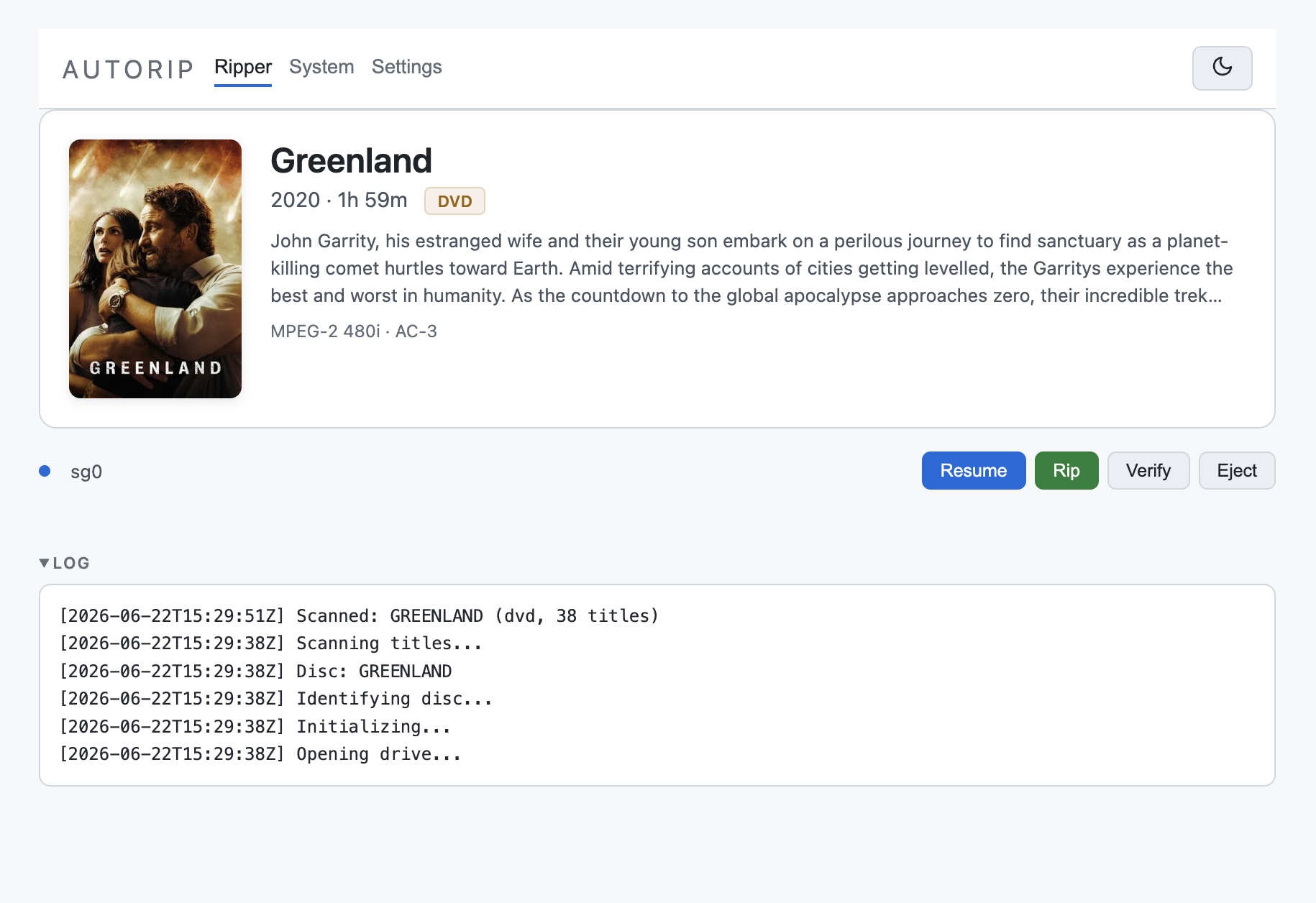
Per-drive controls (Resume, Rip, Verify, Eject) with the live device log expanded below.
State updates stream to the browser over Server-Sent Events (/events).
API reference
Section titled “API reference”autorip exposes an HTTP API on the same port as the UI. JSON errors use {"ok": false, "error": "..."}; simple successes return {"ok": true}. {device} is a drive identifier from /api/state.
State and info
Section titled “State and info”| Method | Path | Description |
|---|---|---|
GET | /api/state | Snapshot of every drive’s rip state, plus move/verify state. |
GET | /api/version | Running version, e.g. {"version":"1.0.0-rc.4.3"}. |
GET | /api/system | System info: mux/move queues and the output file list. |
GET | /events | Server-Sent Events stream of live state pushes. |
Settings
Section titled “Settings”| Method | Path | Body | Description |
|---|---|---|---|
GET | /api/settings | - | Full configuration (secrets redacted). |
POST | /api/settings | JSON config fields | Overlay and persist settings to settings.json. |
Rip control
Section titled “Rip control”| Method | Path | Query / Body | Description |
|---|---|---|---|
POST | /api/scan/{device} | - | Scan the disc (no rip). |
POST | /api/rip/{device} | ?resume=yes|no (optional) | Start a rip. See Resume below. |
POST | /api/verify/{device} | - | Read-only disc health check (non-destructive). |
POST | /api/stop/{device} | - | Stop the active rip; preserves staging for resume (404 if device unknown). |
POST | /api/eject/{device} | - | Eject the disc (409 if a rip/scan is in progress). |
| Method | Path | Description |
|---|---|---|
POST | /api/update-keydb | Download the key database from the configured keydb_url (SSRF-guarded fetch). |
Review and metadata
Section titled “Review and metadata”| Method | Path | Body | Description |
|---|---|---|---|
GET | /api/review | - | List rips on hold awaiting operator review. |
POST | /api/review/resolve | {dir, action, title, year} | Resolve a held rip: proceed, retitle, or cancel. |
GET | /api/tmdb/search | ?q=query | Search TMDB for title candidates. |
POST | /api/title/{device} | {title, year, poster_url, overview, media_type} | Override the matched title for the active disc (one-shot). |
Debug and logs
Section titled “Debug and logs”| Method | Path | Query / Body | Description |
|---|---|---|---|
GET | /api/logs/{device} | - | Per-device log, most recent lines first (plain text). |
GET | /api/debug | ?n=&level=&device=&q= (optional) | Recent debug events (JSON, filterable). |
POST | /api/debug | {"enabled":true|false} | Toggle debug logging at runtime. |
Toggle debug logging and watch the mux stage:
# enable debug loggingcurl -s -X POST http://<host>:8080/api/debug -d '{"enabled":true}'
# stream mux-stage output from the containerdocker logs autorip --tail=500 -f | grep '\[mux\]'
Resume
Section titled “Resume”autorip’s recovery work survives interruptions.
- Default (
POST /api/rip/{device}, no param): starts fresh, but if a resumable staging directory exists, continues from where the previous run left off using mapfile-based resume. ?resume=yes: require an existing resumable staging directory and re-mux the captured ISO without re-reading the disc; returns 404 if none exists.?resume=no: wipe staging and start completely fresh.
Stopping a rip with /api/stop/{device} preserves staging, so a stopped rip resumes on the next disc insert or container restart, with no time lost on a long UHD rip.
Output and notifications
Section titled “Output and notifications”Finished files land in output_dir, optionally split into movie_dir / tv_dir. Set webhook_urls to have autorip POST a JSON event to external systems (a media server, a chat webhook) when a rip or move completes.
When a rip finishes, autorip sends a rip_complete payload:
{ "event": "rip_complete", "title": "Dune: Part Two", "year": 2024, "format": "UHD", "poster_url": "https://image.tmdb.org/...", "duration": "2h 46m", "codecs": "HEVC 4K HDR10 · TrueHD 7.1 · ...", "size_gb": 78.4, "speed_mbs": 24.1, "elapsed_secs": 5460, "output_path": "/output/Dune Part Two (2024)/Dune Part Two (2024).mkv", "errors": 0, "lost_video_secs": 0.0}When the file is moved to its final destination, a smaller move_complete payload:
{ "event": "move_complete", "title": "Dune: Part Two", "output_path": "/output/..." }